The Inspect.Net platform
Inspect.Net turns ordinary photos and video into an inspection report you can defend: coded defects with the evidence that supports them, a severity call, and a repair estimate priced for the property's own market. It is built for inspectors who sign their name under a report.
Free plan: one inspection a month, one seat.
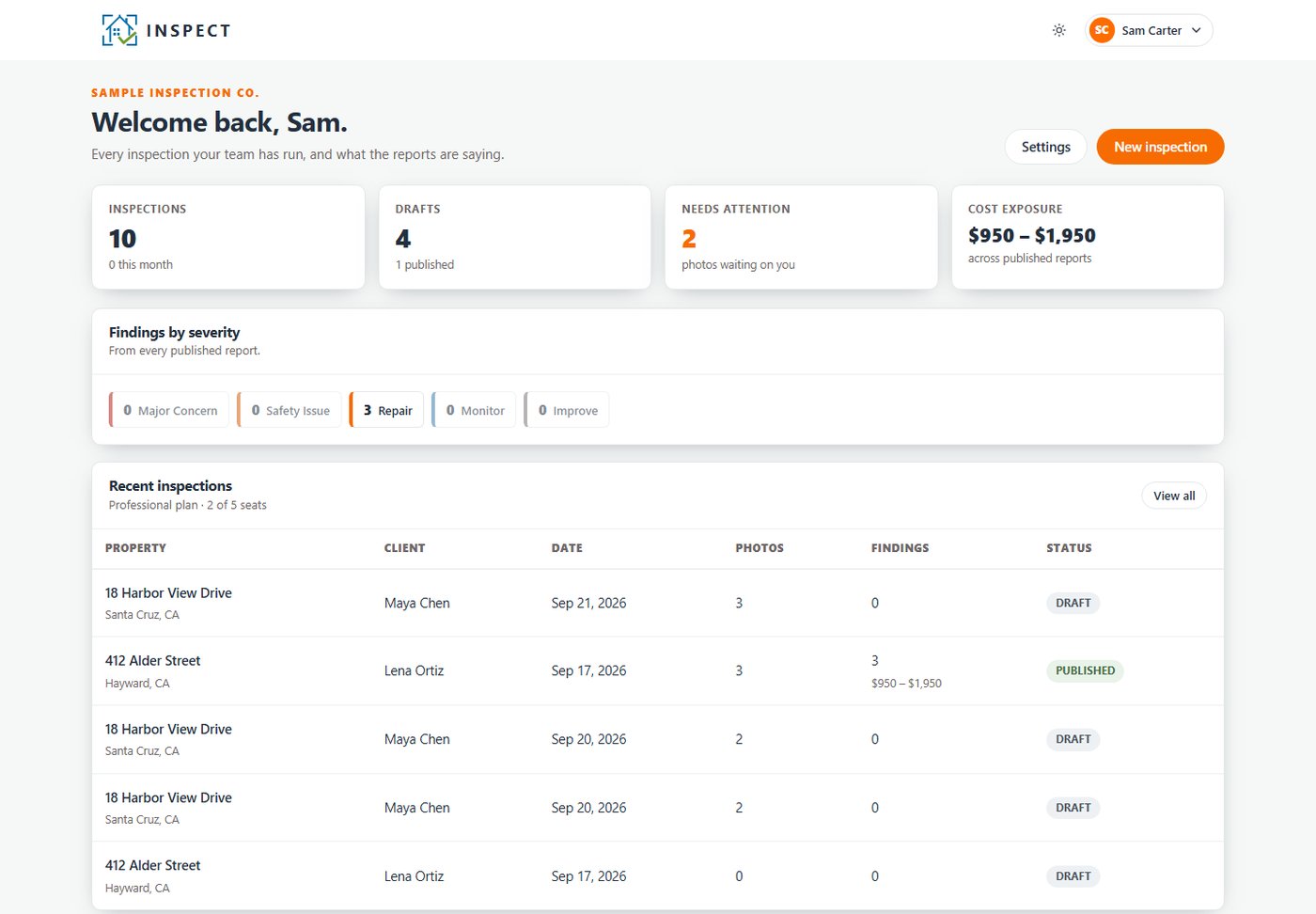
How it works
Three steps. The middle one is the part that used to take an evening.

1Send photos or video
Shoot the home with any phone and upload. HEIC photos and video clips are fine. Every file is fingerprinted on arrival, so the same picture is never analysed or counted twice.

2The engine files and codes
Each photo is filed under its home system and surveyed part by part. The engine may only cite codes that exist in the registry, and each finding carries the evidence you can see in the picture.

3A priced report comes out
Findings are priced from the registry range for the property's own market and frozen as data. The page your client reads and the PDF are the same document.
A tour of the product
Real screens from the app, with a sample firm and a sample job.
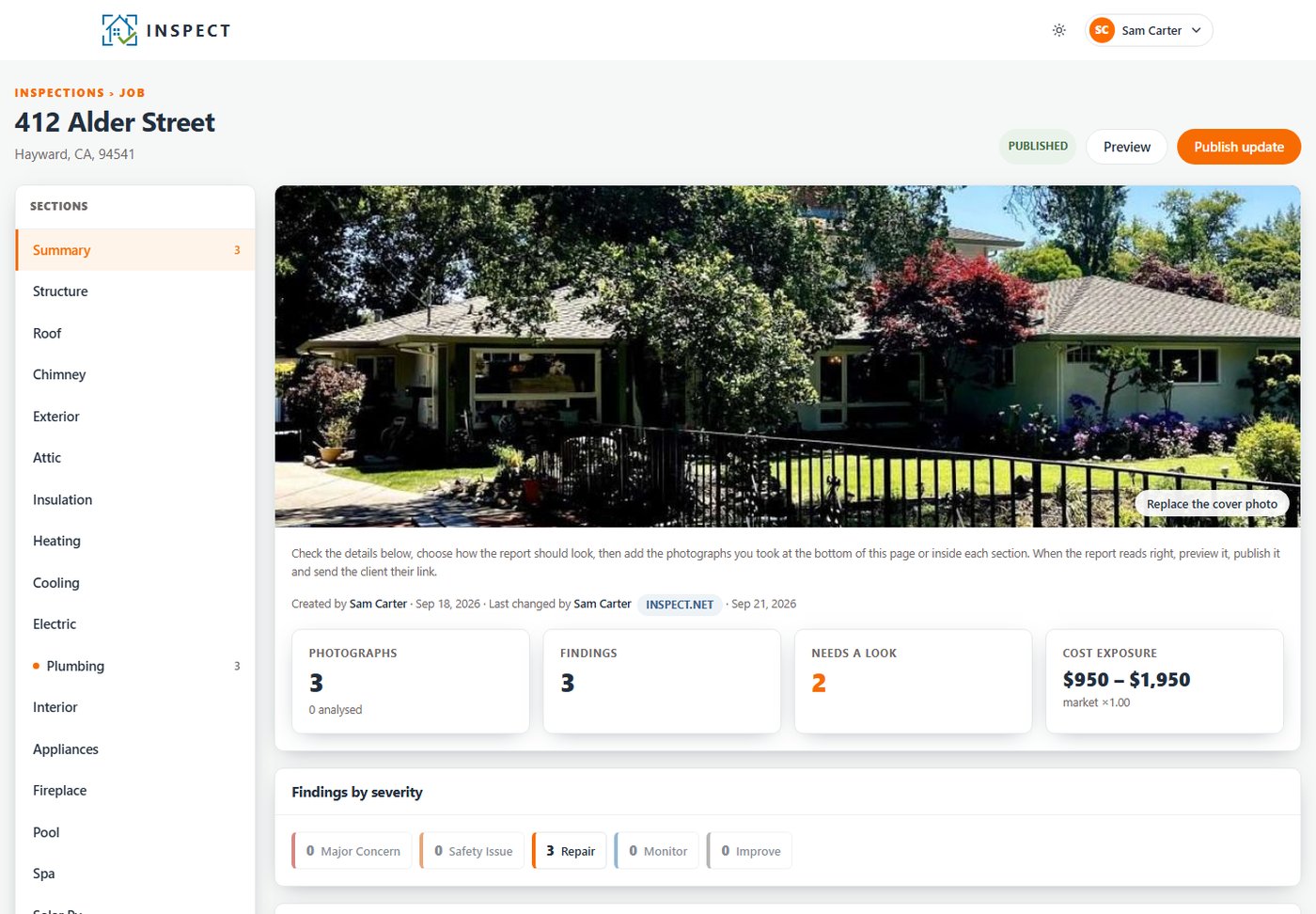
The whole job on one page
A job starts with the address. That is the only thing you must type, so you can open one while you are still standing in the driveway. The home's systems run down the side, and the summary keeps count: photographs, findings, what still needs a look, and the estimated repairs.
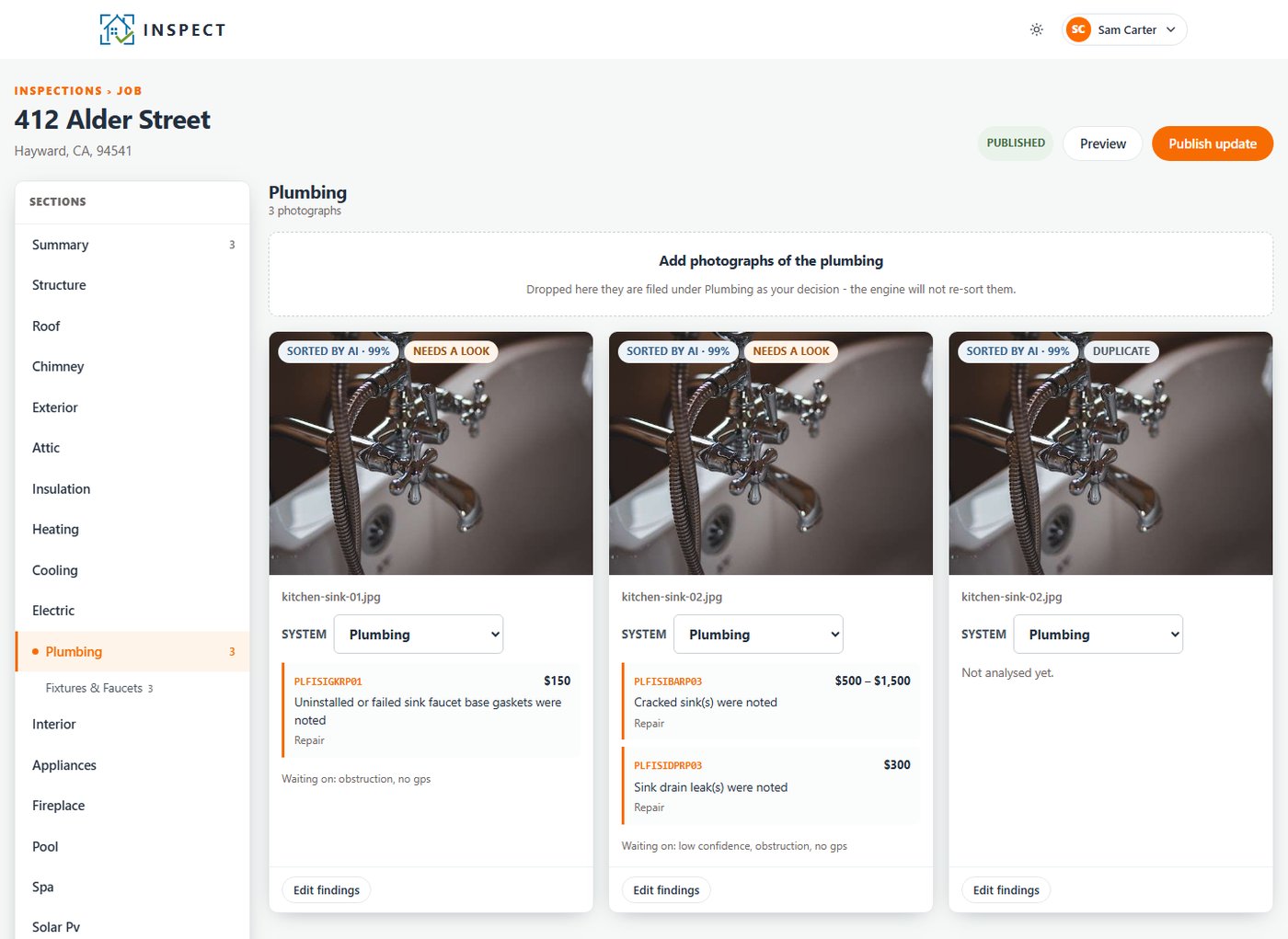
Change a finding without typing a price
Drop the whole job in at once and the engine sorts each photograph into its system. If its call is not the one you would make, open the photograph and pick the right code from the registry. The sentence, the severity and the repair range come with the code. That is why a finding can be defended later: the number came from the priced registry, not from somebody's memory.
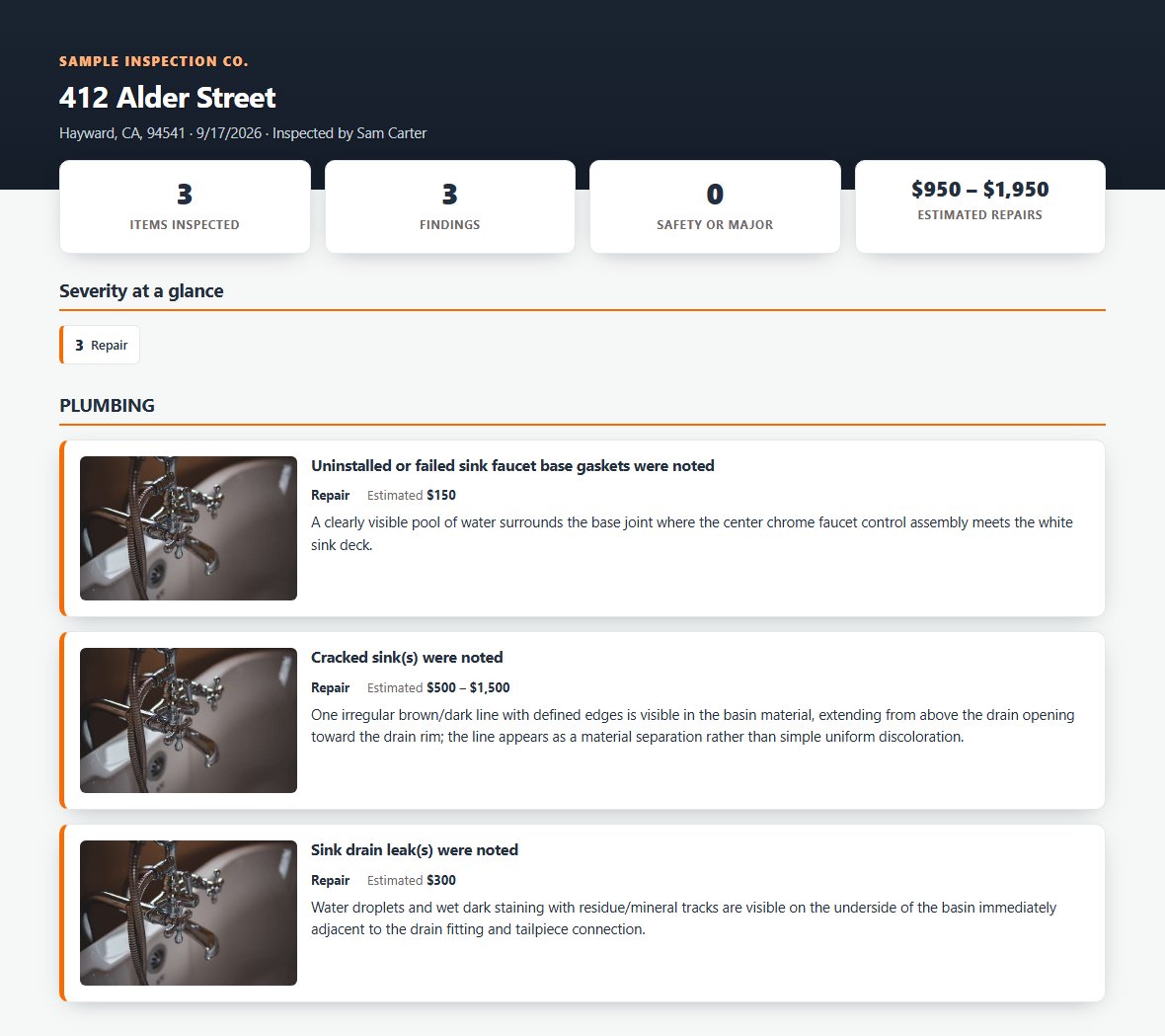
One link and a six-digit code
Publish the report and your client gets a link by email. They type the six-digit code that was sent to the same address, and the report opens. They do not need an account. What they see is frozen at the moment you published, so it says exactly what you signed, and the page itself prints as the PDF.
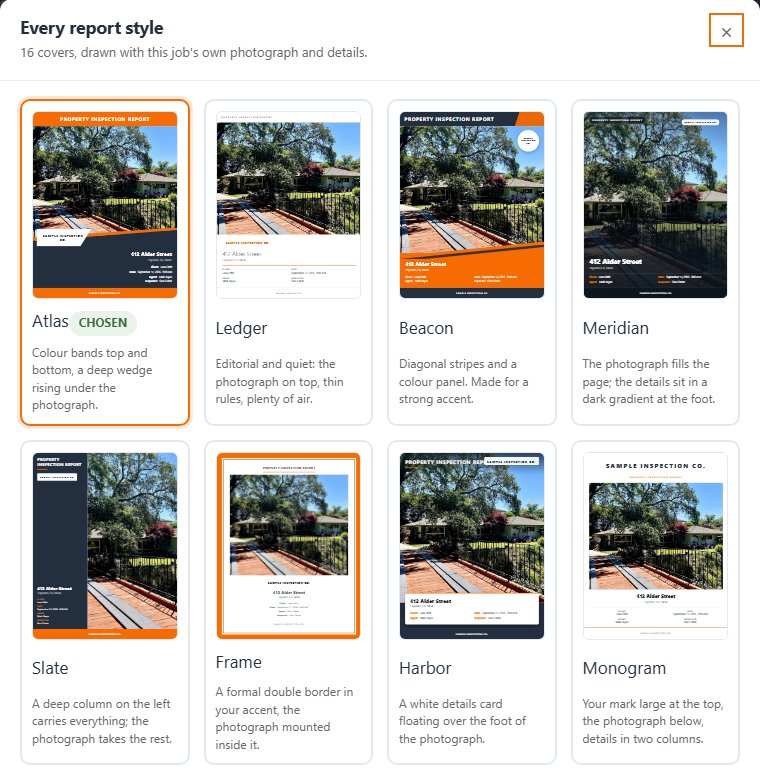
Your name on the cover
There are sixteen cover styles, from quiet and editorial to bold. Each one is drawn in your firm's two colours and carries your logo, so the whole set changes when you set your own pair. Pick one for each job, keep your favourites at the front, and preview the report exactly as the client will open it before anything is sent.
The registry
The registry is the list of everything the engine is allowed to say. It began as my own call library: 17 systems of the home and almost 600 coded defects, each with the sentence an inspector would write, the evidence it needs, a severity and a price range. Firms on a paid plan add their own calls, and every change records who made it and why.
The rules it works under
These are not promises in a brochure. They are how the engine is built.
- It cannot invent a code.The engine picks from the registry and nowhere else. A defect the registry does not cover is set aside for a person, not squeezed into the nearest code.
- It cannot invent a price.The AI never sees a price field. Every figure is looked up by code afterwards, and it is always a range, never a midpoint nobody quoted.
- It asks when it is unsure.Below the confidence bar, a finding goes to a person with the reason attached: a closer photo, a video, or your judgement.
- Time needs video.A photograph has no time in it. A slow drain or a fixture that does not run can only be claimed from footage, and the finding cites the exact seconds.
- Prices are local.The property is placed in its county, and the county in the metro market it legally belongs to. Not the nearest big city, and not a national average.
- A published report is frozen.Change the registry tomorrow and last month's report still says what you signed. Ask it a question years later and it still answers.
The firm workspace and plans
Invite your team by email and give each person a seat. Your company details, logo and colours are set once and print on every report. Every plan runs the same engine under the same rules.
| Plan | Inspections a month | Seats | Your own calls and branding | Support |
|---|---|---|---|---|
| Free | 1 | 1 | No | Help center |
| Standard | 30 | 3 | Yes | |
| Professional | 100 | 5 | Yes | Priority, with onboarding |
| Enterprise | 500 | 20 | Yes | Dedicated |
Current prices are on inspect.net.
Questions
Does Inspect.Net replace a human inspector?
No. It codes what it can prove and sends everything else to a person, with the reason stated. Inspectors deliver the results under their own name. The engine takes the coding, the pricing and the paperwork off their hands, not the judgement.
What media can I upload?
Photos in the common formats, HEIC included, and video clips. Capture time and GPS are read from the file when they are present. A video is sampled into timestamped frames and judged as one sequence in time order.
What happens when the AI is not sure?
It asks instead of guessing. Uncertain findings, blocked views and defects that no code covers go to review with the reason attached, from a closed list of reasons. Nothing uncertain slides silently into a priced report.
How are repair prices localized?
From GPS, the property is placed in its county, and the county in the metro market it legally belongs to under the federal delineations. Each estimate is the registry range for that code multiplied by that market.
Can I edit a report in the browser?
Yes. You edit the findings, not the document. Change a finding, a quantity or a note and the report is rebuilt from the corrected data, so the page on screen and the download can never disagree.
What happens to my photos and videos?
Every upload is fingerprinted on arrival, so the same file is recognized and never counted twice. Your media stays in your workspace and is used as evidence: each finding cites the exact photo, or the exact seconds of footage, that proves it.
Can we bring our own defect library?
Yes. On Standard and above you add your own calls to the registry. On Enterprise we encode your historical library for you, with every mapping decision recorded for your review, so your practice keeps its own voice.
Upload the photos you already have.
Watch them become coded, priced findings in minutes. The first inspection each month is free.
Founded by Jeff Bond. Engineering led by Isaac Marvin Sy, Founding CTO.